How DNS works: what really happens when you type a web address
6 min read
Companion deep-dive to my post on blocking sites with one line. That post needed just enough DNS to make the trick click; this one is the full picture, from scratch.
DNS is the system that turns a name like instagram.com into a number your computer can actually reach. It runs in the half-second after you hit enter, on every site you visit - and almost nobody knows how. Here it is, step by step.
Computers use numbers, not names
Start with the core mismatch. You think in names: instagram.com, google.com, wikipedia.org. Computers don't. Every machine reachable on the internet is found by a number called an IP address, like 157.240.1.35. The name is a convenience for humans; the number is what the network actually routes to.
So before your computer can fetch anything from instagram.com, it has to answer one question: what is the number for this name? That single translation, name into number, is the entire job of DNS, the Domain Name System.
(Quick aside you can skip: those numbers come in two flavours, IPv4 like 157.240.1.35 and the newer, much larger IPv6 like 2a03:2880:f10c::35. We ran low on the older kind because there are only about four billion of them and far more devices than that now. For understanding DNS, just picture "a unique number per machine.")
DNS is the phone book of the internet
The cleanest way to picture DNS is an old phone book. You know a person's name, you want their number, you look it up. DNS is that, at planetary scale: billions of names, each mapped to the IP address of the server that answers for it.

Nobody could memorise the IP addresses of every site they visit, and those numbers change over time anyway. DNS lets the names stay friendly and stable while the numbers underneath can move freely. That layer of indirection is the whole point.
Your computer doesn't ask the internet first
Here's the part that surprises people. When your computer needs the number for a name, it does not run straight out to the internet. It checks a few places in a fixed order and stops at the first one that has an answer:
- A file on your own disk (
/etc/hostson Linux and macOS, a similarly-named file on Windows). A tiny local phone book you can edit by hand. If the name is listed here, this answer is used immediately and nothing else is asked. - Its own short-term memory, the cache. If your computer looked this name up recently, it kept the number for a while and reuses it.
- A DNS server out on the internet. Only if the first two come up empty does the real lookup begin.
The first two steps are about speed and control. The third step is where the interesting machinery lives, so let's follow it.
The journey out to the internet
Here's the analogy that made it click for me. Imagine you want to visit someone at a huge office park, and all you know is their name and which company they work for.
- You arrive at the front gate and ask the security guard. He checks his own little notebook first. If he happens to know the desk, great, he tells you and you're done. If not, he sends you on.
- He points you to the park's main reception. The receptionist doesn't personally know everyone either, but she knows how to find out. She starts making calls on your behalf.
- She calls the park directory, which doesn't know the person but knows which building that company is in. "Microsoft? That's Building A."
- She calls Building A's reception, which knows which floor that team sits on. "Security team? Fifth floor."
- She calls the fifth-floor desk, which finally knows the exact seat. "Desk 761."
She passes that final answer back to you. Now map each character onto DNS:
| In the analogy | In DNS | Its job |
|---|---|---|
| Security guard at the gate | Your browser / OS | Asks the question, checks its own cache first |
| Park main reception | Recursive resolver | Does the legwork of asking everyone else |
| Park directory | Root nameserver | Points to the right top-level domain |
| Building A reception | TLD nameserver (.com, .org) | Points to the site's own servers |
| Fifth-floor desk | Authoritative nameserver | Holds the real answer: the IP address |
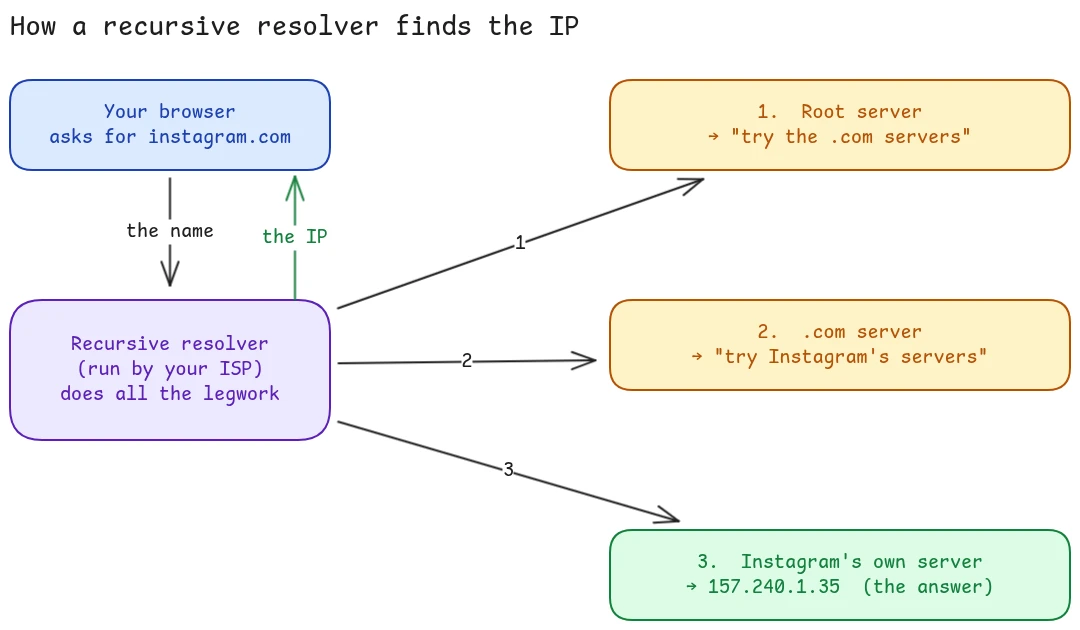
The one doing all the work is the recursive resolver. It's usually run by your internet provider (the ISP), which is why the first thing hit when you go online is often their machine. It asks the root, then the right TLD server, then the site's authoritative server, and assembles the final IP, then hands it back to your browser. Your browser never has to know the whole chain; it just asks once and waits for the number.
Why the second visit is instant
Doing that full walk every single time would be slow, so almost everyone in the chain caches the answer. After the resolver learns that instagram.com is 157.240.1.35, it remembers it for a while. Your operating system remembers it. Your browser remembers it. So the next time you go there, the answer comes from a notebook a few inches away instead of a round trip across the chain.
That caching is also why the whole thing fits inside roughly 100 to 200 milliseconds even though several servers were involved. And it's why a change can take a little while to "spread" - everyone is still holding the old answer until their copy expires.
You never write any of this
Here's the kicker: as a developer, you write zero DNS-resolution code. The browser and operating system handle the entire dance. You type a name; the number arrives. All of the above happens underneath, every time, for every name on every page.
And that's why one line can block a site
Here's the punchline. Remember step 1: your computer checks that local /etc/hosts file before it asks anyone else, and trusts whatever it finds there. So if you write a deliberately wrong answer into that file - pointing instagram.com at a dead address - your computer believes it and never even starts the journey out to the internet. The site is blocked, on every browser, with a single line.
The takeaway: every name you type is checked locally first, cached second, and only sent out to the internet third. That order is a gift - it's why a developer can override any domain by hand, and why blocking a site cleanly is one line instead of a firewall.
I built a small tool around exactly that idea - if you want to see it in action, that's the one-line blocking post.