I blocked Instagram on every browser with one line in a text file
9 min read
Every site-blocker extension I tried was one click from gone - disable it, switch browsers, or just open the site on my phone. Then I found the real trick: you can block a site on your entire computer with a single line in a text file. No extension, no app, no account.
This is how that works, and the small tool I built on top of it.
First, how your computer finds a website
To see why one line does this, you need one fact about how the web works - and it's simpler than you'd think.
Computers don't find each other by name. They find each other by number. Every server on the internet has an address called an IP address - something like 157.240.1.35. The name instagram.com is just a friendly label for humans; the number is what the machine actually needs. So the very first thing your computer does when you type a web address is translate that name into its number. The system that does this is DNS, the Domain Name System. Think of it as the phone book of the internet: you have the name, you need the number, DNS looks it up.
Here's the part almost nobody sees, and it's the part that matters. Your computer doesn't run straight out to the internet to do that lookup. It checks a few places in a fixed order and stops at the first one that answers:
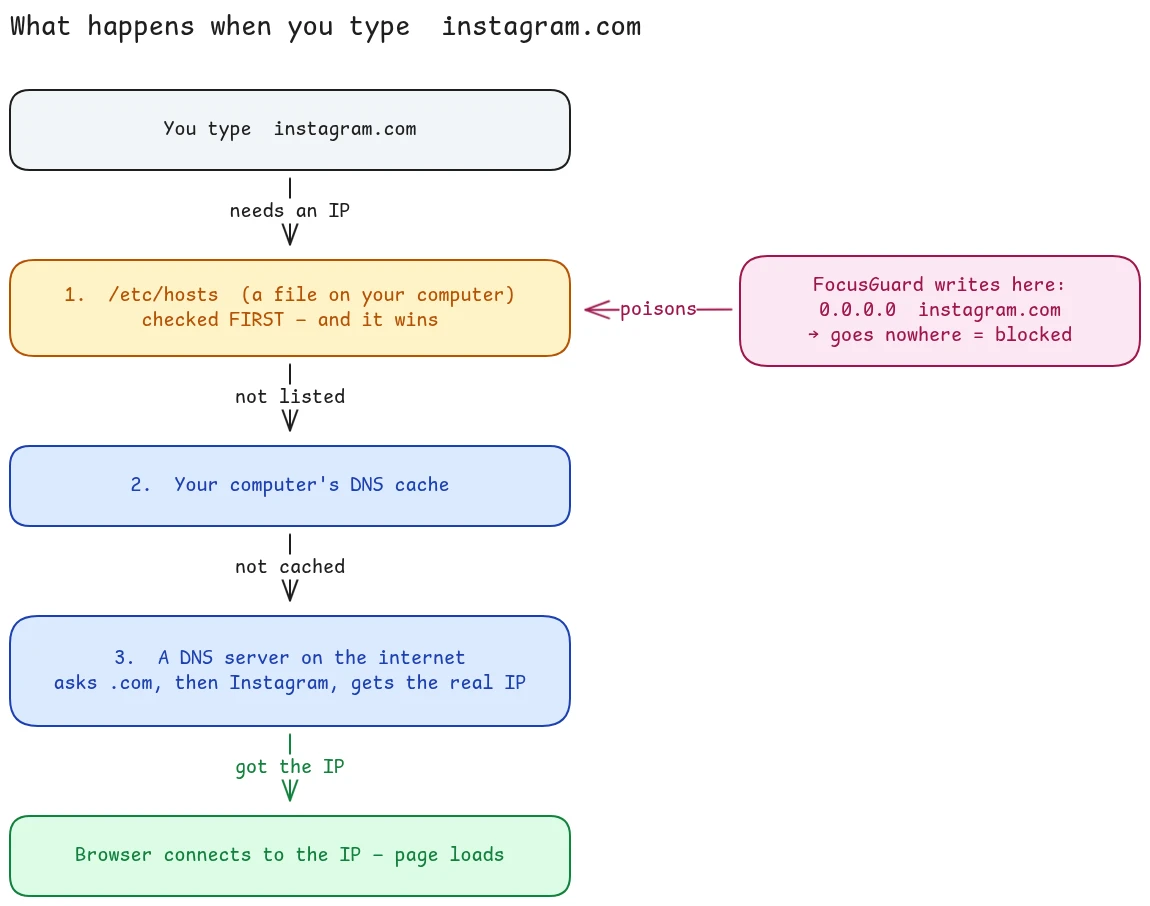
- A plain text file on your own disk, called
/etc/hosts. This is a tiny phone book that lives on your machine. If the name you typed is written in here, your computer takes that answer immediately and never asks anyone else. - Its own short-term memory (the cache). If it looked the name up recently, it still remembers the number and reuses it instead of asking again.
- A DNS server out on the internet. Only when the first two come up empty does your computer reach out to a DNS server (run by your internet provider, or a public one like Google's
8.8.8.8). If that server doesn't know either, it asks the servers in charge of.com, which point it to the servers Instagram runs, which finally hand back the real number.
Once it has the number, your browser connects to it and the page loads. The whole round trip usually takes a few thousandths of a second.
That third step is a whole journey of its own - recursive resolvers, root servers, the .com servers, caching. If you're curious how that part works end to end, I wrote a separate deep-dive: How DNS works. For blocking, though, all that matters is the order things are checked in.
The one sentence to hold onto: /etc/hosts is checked first, and whatever it says wins. Your computer trusts that local file completely and never double-checks it against the internet. That isn't a bug or a loophole - it's built in on purpose, because there are real reasons to override a name by hand (developers testing a site, private office networks, and yes, blocking).
The one line that blocks a website
Once you see that, the trick writes itself. If /etc/hosts is the first place my computer looks, and it believes whatever it finds there without question, then I don't need to stop my computer from reaching Instagram. I just need to hand it a wrong answer before it even tries.
So I add this single line to /etc/hosts:
0.0.0.0 instagram.com
I'm telling my computer "instagram.com lives at 0.0.0.0." And 0.0.0.0 is nowhere - an address that goes nowhere and fails instantly. My computer reads that line, believes it, and never reaches step 2 or step 3. The connection dies before it ever leaves my laptop. The site is blocked.
That's the entire trick. Nothing is intercepting traffic or filtering anything. I just poisoned the very first lookup, and the system does the rest exactly as it was designed to.
Why a text file beats a browser extension
The reason this matters is where the block lives.
A browser extension only blocks inside that one browser. /etc/hosts is read by everything on the machine - every browser, every app, the terminal, all of it. One line, and Instagram is gone from Chrome, Firefox, Brave, and anything else, all at once.
| Approach | What it covers | How easy to bypass |
|---|---|---|
| Browser extension | One browser | Disable it, or switch browsers |
/etc/hosts line | The whole computer | You have to edit a system file |
The real problem: I'd just delete the line
Here's the honest part. I have admin rights on my own laptop. So nothing stops me from opening that file and deleting the line whenever the craving hits. A block I can erase in five seconds is not a block.
So I wrote a tiny background program - a daemon - that does one stubborn thing: every five seconds it rewrites /etc/hosts to match my blocklist. Delete the Instagram line in a moment of weakness, and it's back within five seconds.
I'm not locking myself out forever - I can always stop the daemon if I mean it. The point is narrower: the urge to open Instagram is a reflex that lasts seconds. By the time I'd hunt down how to undo the block, the urge has passed. Friction, not a prison - it only has to beat the impulse, not a determined human.
Knowing where my time actually went
Blocking handles the sites I already know are bad. But I also wanted to see where my attention went, honestly, without guessing. So the same little tool tracks it - and the principle here is just as simple.
Once a minute, two helpers each ask one question and answer it:
- A small browser extension asks: is a browser window focused right now, and am I actually at the keyboard (not idle)? If yes, it sends the domain of the active tab to my local daemon.
- A small system extension asks the same thing for native apps: what app am I focused on - VS Code, the terminal, Files - and am I not idle? It skips browsers, because the browser extension already covers those, and counting both would double the time.
Each of these little pings is a sample. Each sample is worth about a minute of attention. The daemon drops them into a database and counts them up. Ten samples for instagram.com today means roughly ten minutes I actually spent looking at it - not "a tab was open in the background," but real, eyes-on-screen, not-idle time.
That "am I idle?" check is the whole reason the numbers are trustworthy. If I walk away for lunch with a tab open, nothing gets counted. The tool only measures attention I was actually paying.
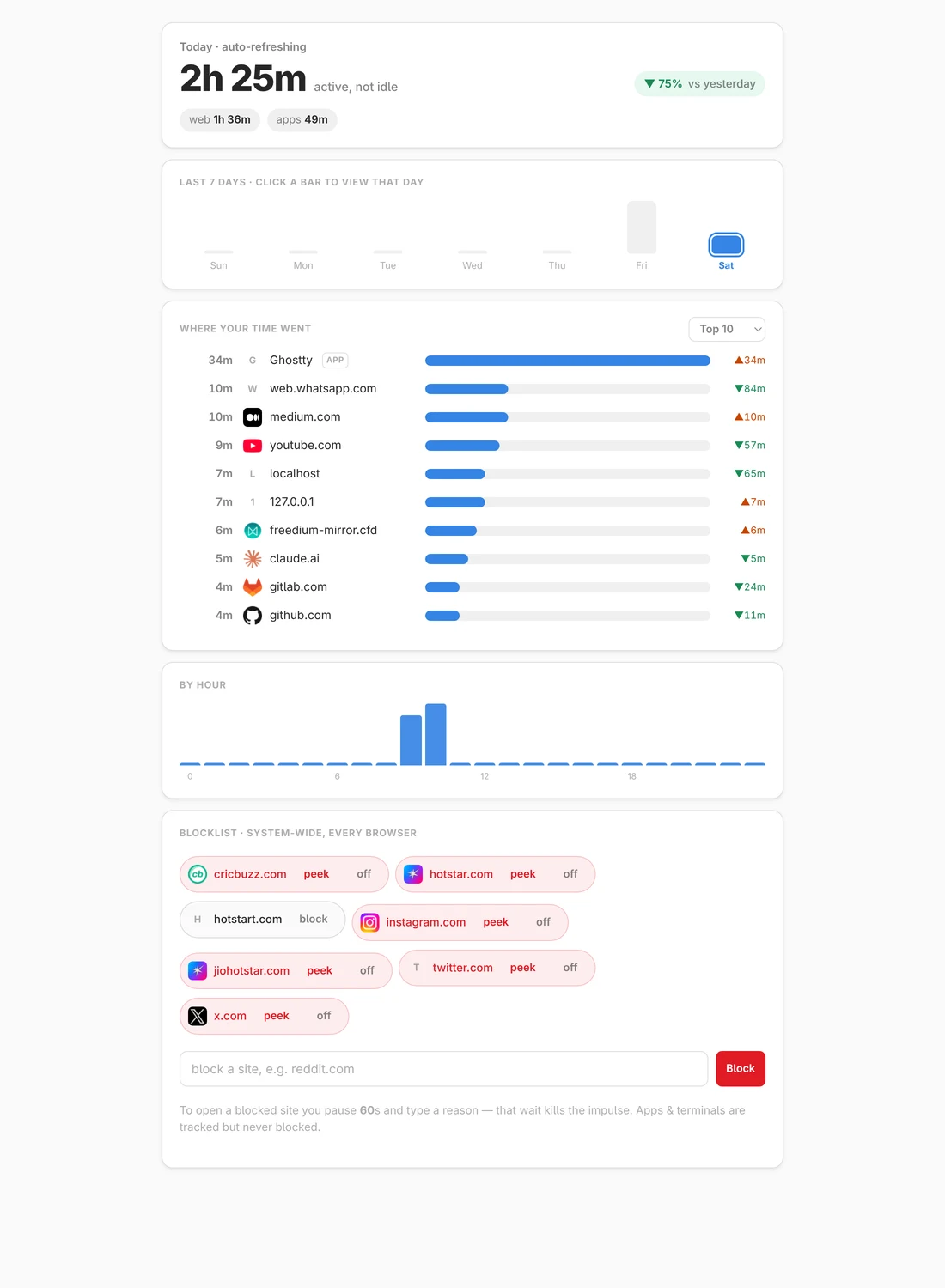
The dashboard above is just that database, drawn as a page. The big number is today's active time, the bars are the last seven days, and the ranked list is every site and app I actually looked at - websites by domain, apps by name. The blocklist sits at the bottom, one toggle per site.
A detail I cared about: it records app and domain names only, never window titles or page URLs. It knows I spent 40 minutes in the terminal; it has no idea what I typed.
Making it hard to cheat on purpose
Sometimes I genuinely need a blocked site for a minute. So there's a temporary unlock - but with deliberate friction baked in. When I ask to unlock a site, two things have to happen:
- A 60-second forced wait. A timer counts down and I can't skip it.
- I have to type a reason for why I'm opening it right now.
Both are enforced by the daemon, not by the screen in front of me, so I can't shortcut the wait by editing a file. Once the minute passes and I've typed my reason, the site opens for the window I picked, then re-blocks itself automatically. Most of the time, sitting through the 60 seconds is enough to realize I didn't actually need it.
What I used
Here's the whole thing on one page - two small extensions that report what I'm looking at, one daemon in the middle that blocks, tracks, and serves, and everything talking over 127.0.0.1 so nothing leaves the laptop:
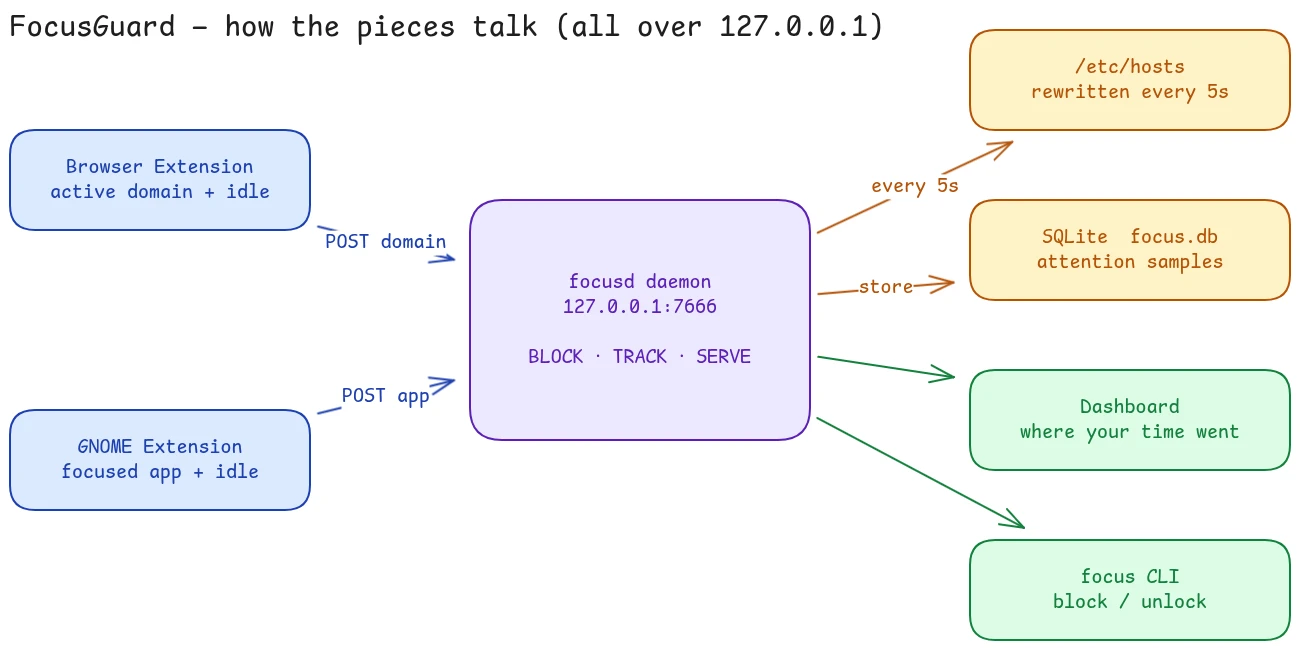
The thing I like most about this project is how little it needed. The whole stack is boring on purpose:
- One Python file, using only the standard library - no installs, nothing to
pip install. It blocks, it tracks, and it serves a small dashboard. - SQLite for storage - a single file on disk, no database server.
- A local-only web server bound to
127.0.0.1, which means it only listens to my own machine. No random website can reach it. - systemd to keep the daemon running and restart it if it dies.
- Two small extensions (one for the browser, one for the desktop) whose only job is to send those once-a-minute samples.
No cloud. No accounts. No data leaving the laptop. One SQLite file holds everything, and I can read it myself.
Honest limitations, so you'd actually trust it
I think a focus tool should be upfront about what it can't do, so here's the real list:
- It's friction, not a cage. I'm admin on my own machine, so I can always stop the daemon. That's by design - it only has to beat the reflex.
- A new block can take up to a minute in Chrome, because Chrome remembers addresses for a short while. It's instant in a fresh tab.
- Blocking is for websites only. Apps and the terminal are tracked but never blocked - I wanted to see that time, not wall it off.
- The desktop tracking needed an extra hop because my machine runs Wayland, where, for security, no outside program is allowed to read which window is focused. So that little extension has to run inside the desktop session and push the info out to the daemon. Without it, websites still get tracked fine; the apps list is just empty.
Why the simple version won
A cloud app with accounts and a slick dashboard would have been more work and worse. The /etc/hosts trick blocks every browser at once for free. A five-second loop turns a deletable line into real friction. A once-a-minute "are you actually looking?" sample turns into an honest attention log. None of the pieces are clever on their own - putting the simplest version of each together is the whole tool.
The takeaway: you rarely need a big system to solve a personal problem. A primitive the OS already hands you (/etc/hosts), a five-second loop, and a once-a-minute sample were enough to build the whole thing. It's been running for months now, quietly reverting my worst impulses every five seconds - and I open Instagram a lot less.