I reverse-engineered Cricbuzz's live scores. It's one JSON file on a 5-second loop.
7 min read
Open a live match on Cricbuzz and the score updates on its own, no refresh. I always assumed that meant websockets - a live pipe the server pushes updates down. So I opened the Network tab to check. The real answer is simpler, and smarter: the page asks for one JSON file every ~5 seconds, and a CDN makes that cheap enough to serve tens of millions of people at once. Here's the whole thing, traced step by step.
One request runs the entire page
I opened a live Test (IND vs AFG), hit F12 → Network → filtered to Fetch/XHR, and there it was - a single data call:
GET https://www.cricbuzz.com/api/mcenter/comm/148382
The URL reads like plain English once you split it: mcenter = match center, comm = commentary, and 148382 is the match ID - the exact same number sitting in the page's address bar. No token, no auth header, no login. Just a match ID. You can paste that URL into a browser and get the raw score back as JSON.
It just asks again. And again.
The Network tab didn't show one request. It showed the same one, over and over:
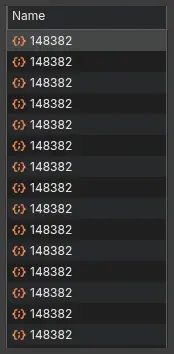
Every row is the page re-fetching the identical URL. That's polling: instead of the server pushing updates to you, the page pulls them on a timer. There was no websocket - the Socket filter stayed empty the entire time.
How often does it pull? The response headers give it away:
cache-control: max-age=5
The server declares the data "fresh for 5 seconds." That's the heartbeat - roughly one fetch every five seconds. Hold onto that number, because it turns out to be the whole secret.
What comes back: the whole match, in one object
One GET returns one JSON, neatly split into sections:
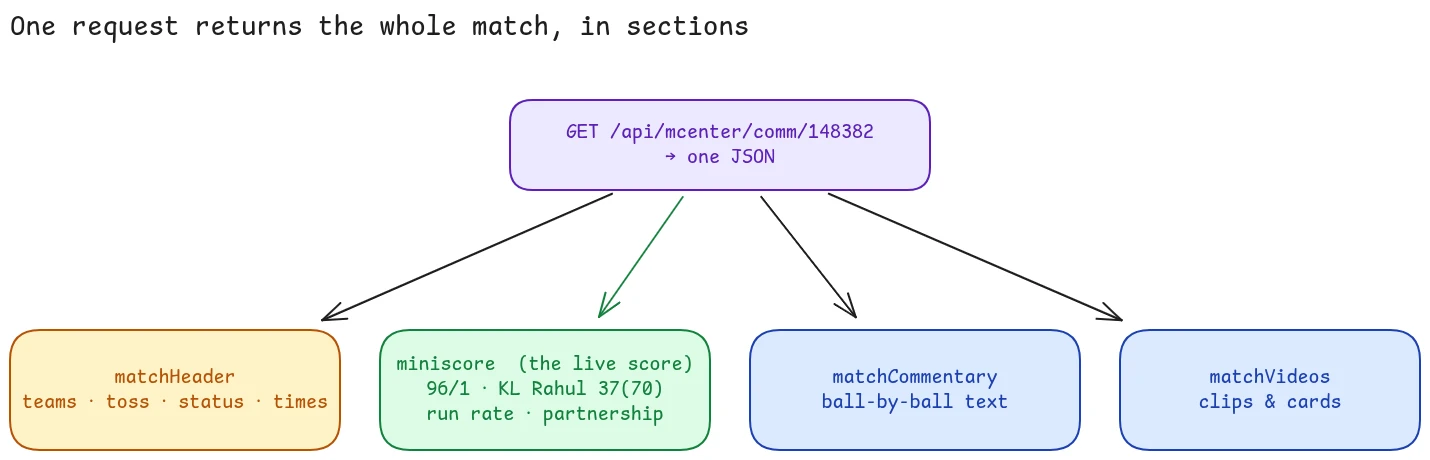
The one that matters is miniscore - the actual live state of the match:
"miniscore": {
  "batTeam": { "teamScore": 96, "teamWkts": 1 },
  "batsmanStriker":    { "name": "KL Rahul",      "runs": 37, "balls": 70 },
  "batsmanNonStriker": { "name": "Sai Sudharsan", "runs": 32, "balls": 49 },
  "currentRunRate": 3.84,
  "status": "Day 1: Lunch Break",
  "responseLastUpdated": 1780725931
}
That single object is everything you see on screen: the score, both batsmen, the bowler, run rate, partnership. The rest of the response carries matchHeader (teams, toss, format), matchCommentary (ball-by-ball text like "Kharote to Rahul, 1 run, drive to long-off"), and matchVideos. The responseLastUpdated timestamp tells the page exactly how fresh the data is.
So the front end is almost dumb: fetch this object every few seconds, drop the numbers into the page. All the intelligence is in how that fetch scales.
The clever part: surviving 29 million people
The match page showed a viewer count: 2.9 crore - 29 million. Picture even a few million of them watching at once, each polling every 5 seconds. That's over a million requests a second for the same tiny file. No single origin server answers that.
It doesn't have to. That cache-control: max-age=5 isn't just advice to your browser - it's an instruction to a CDN.
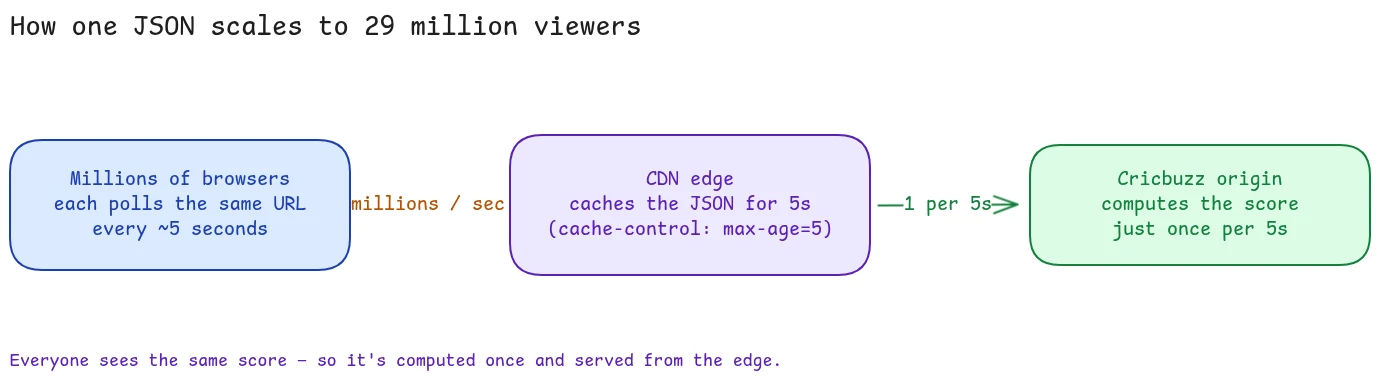
The response comes from a CDN edge near you - I could see it in the headers: an edge IP, gzip compression, and geo tags like cb-loc: IN and cb-reg: TN. (That edge is Akamai - I confirm it from the terminal in the next section.) The edge caches the JSON for a few seconds and serves all those millions straight from memory. Behind it, the origin computes the score just once per cache window, no matter how many people are watching.
Millions of requests in, one computation out. That's the entire trick, and it's why a 5-second staleness window is a feature, not a compromise - it's the dial that decides how much load the origin ever sees.
Why polling beats websockets here
Websockets feel like the right tool for live data. For this, they'd be worse:
- A websocket is a stateful open connection per viewer. 29 million viewers means 29 million connections to hold open. A poll is stateless - the server forgets you the instant it replies.
- A CDN can cache a GET response. It cannot cache a websocket stream the same way; every connection is unique. Caching is the entire reason this scales, and polling is what makes caching possible.
- Everyone watching sees the same score. It's a broadcast, not a conversation.
Websockets earn their keep when updates are per-user or sub-second - a chat, a trading screen, a multiplayer game. A cricket score that changes every few balls is neither.
Don't trust me - curl it
None of this needs a browser. From a terminal, with no cookies and no API key:
curl --compressed https://www.cricbuzz.com/api/mcenter/comm/148382
That returns the whole match as JSON, 200 OK. Two things from the response confirm the scaling story:
- It's Akamai. The request resolves to
23.37.86.31, which reverse-DNSes toa23-37-86-31.deploy.static.akamaitechnologies.com. You're talking to an Akamai edge, not Cricbuzz's origin. - You can watch the cache age. Hit it twice a few seconds apart and the
cache-controlcounts down -max-age=7on the first call,max-age=3on the second - with byte-for-byte identical bodies. That's one cached object being served to both calls, reporting the time left before it refreshes. Everyone in your region gets that same copy.
So the "real-time" score is, underneath, a small static file that Akamai regenerates every few seconds. Boring. Bulletproof.
I rebuilt it in 27 lines
If the whole live score is one public JSON, a working scoreboard is just poll it and print it. Here's the entire thing, standard library only:
import json, sys, time, urllib.request

MATCH_ID = sys.argv[1] if len(sys.argv) > 1 else "148382"
URL = f"https://www.cricbuzz.com/api/mcenter/comm/{MATCH_ID}"

def fetch():
    req = urllib.request.Request(URL, headers={"User-Agent": "livescore/1"})
    with urllib.request.urlopen(req, timeout=10) as r:
        return json.load(r)

def scoreline(data):
    m = data["miniscore"]; bt = m["batTeam"]
    team = m.get("batTeamScoreObj", {}).get("teamName", "")
    s, ns = m["batsmanStriker"], m["batsmanNonStriker"]
    return (f'{team} {bt["teamScore"]}/{bt["teamWkts"]} ({m["overs"]} ov)  '
            f'CRR {m["currentRunRate"]}  |  '
            f'{s["name"]} {s["runs"]}({s["balls"]})*  '
            f'{ns["name"]} {ns["runs"]}({ns["balls"]})  |  {m["status"]}')

while True:
    try: print(time.strftime("%H:%M:%S"), scoreline(fetch()), flush=True)
    except Exception as e: print("error:", e, flush=True)
    time.sleep(5)
I ran it during the break (96/1) and again once play resumed - the score updated on its own, no websocket, no key:
11:52:10  IND 96/1  (25 ov)    CRR 3.84  |  KL Rahul 37(70)*  ...  |  Day 1: Lunch Break
12:14:51  IND 104/1 (25.4 ov)  CRR 4.05  |  KL Rahul 45(74)*  ...  |  Day 1: 2nd Session
The same five-second poll the real site uses, in a file you can read end to end.
One honest limit: this is the commentary endpoint only. The Scorecard and Overs tabs hit their own endpoints, which I couldn't guess from outside (I tried - they 404). The only reliable way to find them is to open each tab with the Network panel watching. In a dynamic site, you observe the runtime; you don't guess the URLs.
Why the clone works (and where to stop)
The clone works for one unglamorous reason: Cricbuzz doesn't block it. The endpoint is public, needs no key, and comes straight from Akamai's cache - so a single slow poller just looks like one more reader asking for a file that's already sitting at the edge.
That's also the line I'd draw. Reading a public response your own browser already fetches, at a human pace, to understand how something works - that's fair, and it's all I did here. Hammering the endpoint in a tight loop, or rebuilding the product to compete with it, is not: that's their bandwidth and their data. There's no reason to go fast anyway - the cached copy only refreshes every few seconds, so polling quicker just returns the same bytes. Poll politely, keep it personal.
And to be clear it isn't a static file: watching it live, the responseLastUpdated stamp advanced and the score ticked from 105 to 107 on its own, mid-over - real updates flowing through the same cached endpoint, every few seconds.
The takeaway
"Live" almost never means websockets. For read-heavy, one-to-many data - scores, prices, vote counts, view counters - the boring, bulletproof pattern is: serve a cacheable JSON, poll it on a short loop, and let a CDN absorb the crowd. Cricbuzz reaches tens of millions of people with an endpoint you can curl, and the only "real-time" component is a five-second cache.
Want to see it yourself? Open any live match, hit F12, go to Network → Fetch/XHR, and watch /api/mcenter/comm/<id> tick by. Everything here was just my own browser reading public responses - which is the most honest way there is to learn how something actually works.